
FREE
For Windows 7, Vista, XP
FlipBookMaker PDF Reader (Freeware)
Import PDF files and enjoy reading as flipping book smoothly;

- Why Us?
- Screenshots
- How It Works
FlipBookMaker PDF (the short name of Portable Document Format and can be read and opened on all operation systems) Reader enables users to download to users without any payment and registration. With FlipBookMaker PDF Reader, the PDF file can be imported and opened as flipping book which is with 3D page turning effect and sound like turning page of real book. However, FlipBookMaker PDF Reader is an excellent tool to read and print PDF file without damage even it is totally free. Users can experience a different way to read PDF file from the traditional one with FlipBookMaker.
Absolutely Freeware to download and use

FlipBookMaker PDF to JPG is powerful convert to convert PDF file into JPG. It is absolutely free to download and convert your PDF file. There is no need to register at all. Just open it and get start to use. We guarantee that you won’t pay any for FlipBookMaker PDF to JPG software.
Read PDF as flipping book smoothly

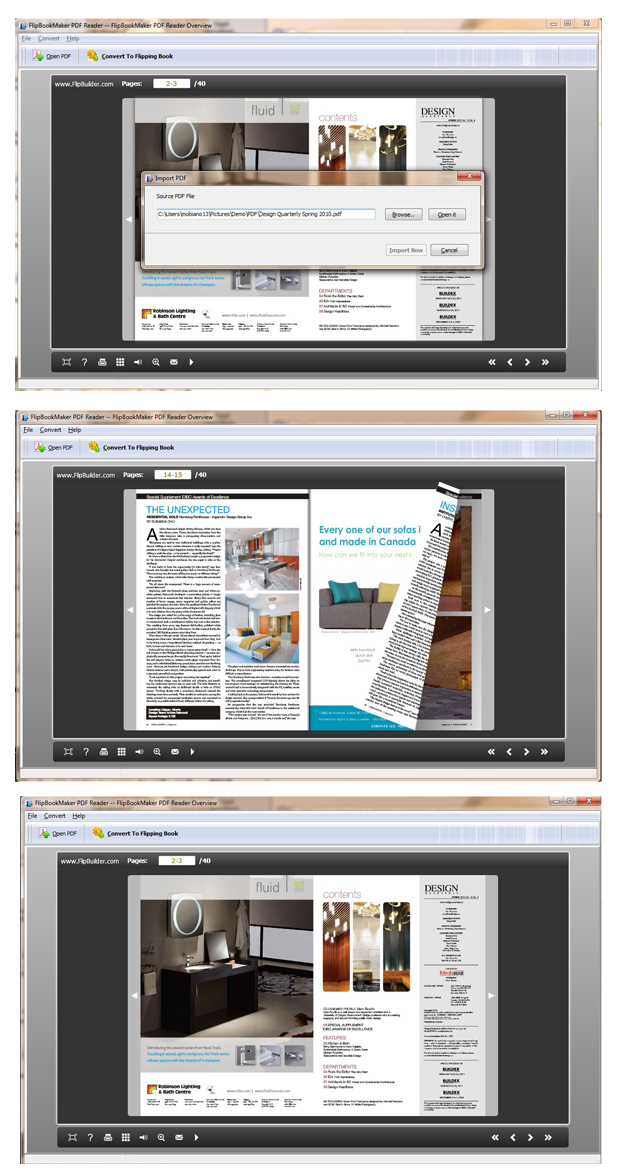
FlipBookMaker PDF Reader enables users read PDF as flipping book. It means your PDF file can be 3D page flip as a real paper book and you can hear the page turning sound same as the paper book. On one hand, users no need to read PDF by dragging page and page; on the other hand, you can enjoy your PDF file as a real book. However, it is not difficult to make your PDF as flipping book but just with two steps with FlipBookMaker PDF Reader.
Enjoy reading with functional buttons of FlipBookMaker PDF Reader

Easy-to-use Design of FlipBookMaker PDF Reader
As you can see that the interface of FlipBookMaker PDF Reader is quite simple. There are just some important buttons in the toolbar. You can begin to read PDF to flipping book with two steps. And then add action for the flipping book with several buttons. If you really have no idea how to start, just check the help button first. It will show you how to read PDF as a wonder style flipping book.