
Make a pretty photos album with Flip Book Maker for Album
Are you bothering how to pick up a nice and full of love gift for your friends? Do you think it is not an easy job for you to choose a really perfect gift? So, do you ever think about making a flash flip photos album for your friends as a gift? Today, we plan to introduce you more details about flip book maker for album. The topic today is how to decorate your photos and make a pretty photos album with flip book maker for album.
Last post we talk about what flip book maker for album can do, today let’s begin today topic with how to add background. No matter what photos you want to add, you should create a new page or more first. Just click the toolbar in the left side, you can select the background from the default and choose from your computer. Next is to choose a photo. Here you should know that the photo can’t be shown the whole picture but a part (as picture show). When you add a photo you can decorate the photos with the toolbar on the top.
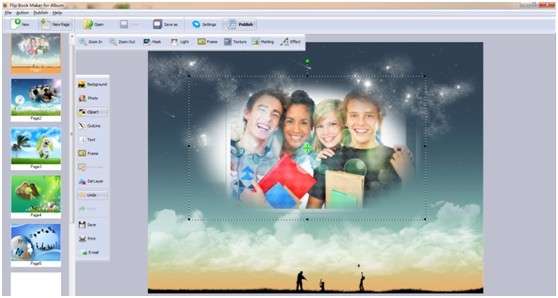
After that, you can make your photos album more beautiful with adding cute clipart and outline. You just need to click on the clipart or outline you like. Then they will be shown on the photos. In addition, you are allowed to add a beautiful frame for you photos album and text to make your photos looks sweeter. After finishing decoration of photos, it is time to publish it into flip album.

Don’t you think it is quite easy to make a lovely and sweet album? Just try flip book maker for album to make your own pretty flip photo album.
Download Flip Book Maker from here to have a try
Flip Book Maker for Shopping>>
Explore Our Other Free Software:animation software | free animation software | free animated video maker | animation maker | animation video maker | free animation maker | whiteboard animation software | whiteboard animation maker | whiteboard video maker | character maker free | 2d character creation software | 2d character animation software | text to video | text video maker | text video software
About us | Terms & Conditions | Privacy | Contact us | Site Map
Copyright © 2015 FlipBookMaker Software Co., Ltd. All rights reserved.